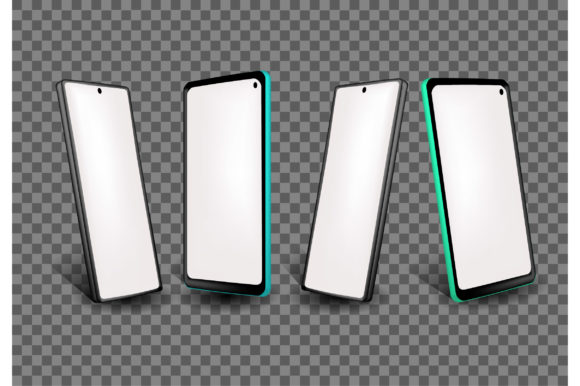
Handphone 3D Mockup: A Smart Visual Tool for Modern Business Presentations
When it comes to showcasing mobile app designs, digital marketing campaigns, or product visuals, a Handphone 3D Mockup offers a dynamic and professional way to present ideas. Whether you're pitching to clients, updating stakeholders, or promoting your brand online, using a 3D mockup can elevate your presentation from flat and generic to engaging and realistic. But like any design tool, its effectiveness depends on how well you understand and apply it.
Why People Use Handphone 3D Mockups
Designers, marketers, and entrepreneurs often turn to Handphone 3D Mockup templates to visualize how a mobile interface will look in real-world settings. These mockups allow for easy customization, helping users preview app screens, website layouts, or branding elements on a realistic smartphone model. Their popularity stems from the need to communicate ideas clearly and persuasively without requiring advanced 3D modeling skills.
Common Mistakes When Choosing or Using a Handphone 3D Mockup
While mockups are powerful tools, they’re often misused in ways that reduce their impact or even mislead audiences. Here are some common pitfalls and how to avoid them:
1. Overlooking Compatibility and File Formats
Many users download a mockup only to find it's not compatible with their design software. Some templates are made for Adobe Photoshop, others for Figma or Blender. Always check the file format before downloading. If you're not familiar with 3D modeling tools, look for mockups that come with easy-to-use templates or layered PSD files.
2. Ignoring Resolution and Scalability
A low-resolution mockup can make your final presentation look blurry or unprofessional. This is especially important when presenting on large screens or printing materials. Choose high-resolution (at least 300 DPI) mockups that scale well across different formats, from digital slides to printed brochures.
3. Misrepresenting the Final Product
One of the most misleading practices is using a mockup that makes a design look more polished or advanced than it actually is. For example, adding too many effects or unrealistic lighting can create false expectations. Stick to mockups that reflect the actual interface and user experience you're offering.
4. Using Generic Mockups Without Customization
Free or mass-produced mockups often lack originality. If your audience sees the same phone model used in dozens of other presentations, it diminishes your brand's uniqueness. Customize the background, lighting, and device color to better align with your brand identity and message.
5. Neglecting Context and Audience Needs
A mockup that works for a tech startup might not be suitable for a healthcare presentation. Consider the context in which your design will be viewed. Is the phone mockup being used in a realistic environment? Does it reflect how the app or product will actually be used? Always tailor the mockup to your audience’s expectations and industry standards.
How These Mistakes Affect Your Work
Using the wrong mockup or applying it poorly can lead to confusion, reduced credibility, or wasted time. For example, a poorly scaled mockup in a client meeting might lead to misunderstandings about the final product. Similarly, a low-quality image can reflect poorly on your professionalism, especially in competitive industries like marketing, design, or entrepreneurship.
How to Choose and Use a Handphone 3D Mockup Wisely
Here are some practical tips to ensure your mockup enhances your presentation rather than hinders it:
- Know your tools: Make sure the mockup format matches your design software. If you're using Canva, look for Canva-compatible templates. Photoshop users should opt for layered PSD files.
- Check licensing: Always verify whether the mockup is free for commercial use or requires attribution. Some platforms offer premium mockups with extended licenses that are worth the investment.
- Customize thoughtfully: Adjust lighting, background, and perspective to match your project’s tone. Don’t just drop your design into the mockup—make it part of the scene.
- Use realistic scenarios: Show the phone mockup in a context that reflects actual usage. For example, if you're presenting a travel app, use a mockup showing the phone outdoors or in a traveler’s hand.
- Keep it simple: Avoid overloading the mockup with unnecessary effects. The goal is clarity, not distraction.
What to Check Before Downloading or Using a Mockup
Before finalizing your choice, consider the following:
- Resolution: High-quality visuals are essential for both print and digital use.
- Customization options: Can you easily change the screen content, background, and lighting?
- Compatibility: Does the file work with your preferred design tool?
- Usage rights: Are you allowed to use it in commercial projects or presentations?
- Realism: Does the mockup accurately reflect how the phone or app will appear in real life?
Realistic Examples of Better Mockup Use
Imagine you're a small business owner launching a new e-commerce app. Instead of using a flat screenshot, you opt for a Handphone 3D Mockup that shows the app interface on a smartphone held in a hand against a clean, modern background. This helps potential investors visualize the user experience and understand the app’s design flow.
Or consider a digital marketer preparing a presentation for a client. Rather than using a generic phone image, they choose a mockup that integrates the client’s brand colors and shows the app in action—scrolling through product pages, receiving a notification, or completing a purchase. This builds trust and shows attention to detail.
Conclusion
A Handphone 3D Mockup is more than just a visual shortcut—it's a communication tool that, when used correctly, can significantly enhance how your ideas are received. By avoiding common mistakes and choosing the right mockup for your needs, you’ll ensure your presentations are clear, professional, and impactful. Whether you're a beginner or a seasoned professional, taking the time to select and customize your mockup wisely will pay off in credibility, clarity, and audience engagement.